 By
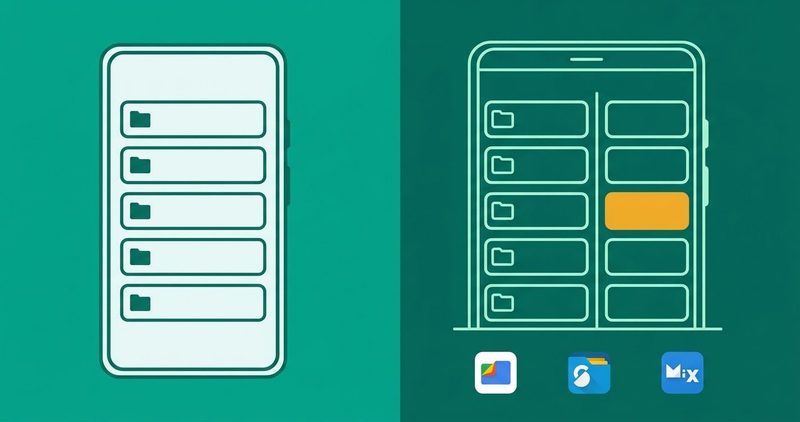
People ask me which file manager to install, and the familiar answer is Solid Explorer or MiXplorer, said with total confidence. The honest answer depends on who you are. A phone used for WhatsApp photos and downloads needs a different tool than one that moves files across folders, shares and cloud drives. I test on a Tecno Spark 40. Every claim below is tied to what the listings and documentation printed on 13 November 2026.
One plain line before the picks: no link here is an affiliate link and no vendor paid for a place here. The full affiliate disclosure is one tap away, and it says the same thing.
Which file manager earns its place on Android? The quick summary
- Files by Google is the free, default-style pick for cleanup and browsing.
- Fossify File Manager is the free, open-source pick with fingerprint and password locks.
- Cx File Explorer is the free pick for per-type storage analysis.
- Solid Explorer is the paid dual-pane pick; a 14-day trial is free, then a one-time unlock.
- MiXplorer Silver is the power pick with the add-ons bundled; free on XDA, or $6.99 on Play today.
- Material Files is the free, open-source lane with FTP, SMB and WebDAV.
- ES File Explorer was removed from Play in 2019 and is buried below, not listed.
Simple or power, which one are you
Android splits file managers into two lanes, and the split is the whole decision. Simple lane users browse, share offline and clean junk. Power lane users move directories, reach network shares and lock files behind biometrics. The table draws the line.
| What you do with files | Lane | Start with |
|---|---|---|
| Clean storage, open downloads, send files offline | Simple | Files by Google, Fossify, Cx |
| Sort folders, rename in bulk, dedupe photos | Simple, borderline | Cx or Fossify |
| Move whole trees between folders, SD card and cloud | Power | Solid Explorer |
| Reach a NAS or shared PC folder from the phone | Power | Material Files, Solid, SambaLite |
| Everything in one build, with automation | Power | MiXplorer |
| Open source, no account, no ads | Open source | Material Files, Amaze, Fossify |
The simple lane: Files by Google, Fossify, Cx
Files by Google is free, from Google LLC, and its Play listing prints no price. Android Authority calls it "a great way to clean up duplicate files and maintain free space on your device". It ships as the default option on many phones. I read that page on 13 November 2026. It scans, it suggests, it deletes. It will not reach a network share, and it is not built to.
Fossify File Manager is the privacy-shaped variant, free with no ads and no in-app purchases on its Play listing, read the same day. It is open source, and it locks individual files and folders behind a fingerprint or a password, which Files by Google does not. For a reader who wants the familiar layout plus real locks, Fossify is the pick.
Cx File Explorer is free on Play with its own analysis tools. Android Authority names the same strengths: analysis tools that show where storage hogs live, how much each file type uses and which files are largest. It also plays image, video and audio files. For a phone that keeps nagging about storage, that is the pick to open first. The habits that keep it free again live in my storage full guide.
The power duel: Solid Explorer vs MiXplorer
Both are real tools with real histories. Android Police dates MiXplorer to over a decade of active development; I read that on 13 November 2026. The XDA thread that hosts it free dates to 17 May 2011. XDA calls it one of the oldest still-supported free file managers on Android, read the same day.
The dual-pane math is the reason people pay. MakeUseOf spent almost ten minutes sorting a mixed folder of photos and PDFs on a single-pane manager. Solid's two panes let you drag files between source and destination directly. I read that story on 13 November 2026. Android Authority notes Solid's real-time folder sizes, two-pane view and fingerprint lock, read the same day. Solid's free build carries ads. The Play listing today prints a free install, Contains ads and In-app purchases, developer NeatBytes. The 14-day trial unlocks everything, then a one-time purchase keeps it.
MiXplorer takes the opposite route. The full app is free and ad-free from the developer's XDA thread, by HootanParsa. MiXplorer Silver on Play is the paid bundle: the app plus Archiver, Image, Tagger and PDF add-ons. It prints $6.99 on the US storefront today; the UK storefront prints £6.49. Your storefront prints its own price.
One box fix. MakeUseOf's app box reads "Free, Subscription available" and names the developer "NearBytes". Both wrong: the Play listing prints NeatBytes as developer, and nothing on it mentions a subscription. mobikin's duel prices Solid after the trial at about $2.99 to $4.99 by region, one-time; I read that on 13 November 2026. The listing prints no price today. Solid is not a subscription.
MiXplorer carries two honest caveats. First, the Google Drive path broke in 2024. Google limited API access, and MiXplorer cannot see Drive files unless the app is verified with Google. Verification is usually a paid step, though a free workaround exists. Android Police covers it, in a piece dated 4 July 2026; I read it today. Second, the menus are byzantine, the same piece's word. It rewards a few sessions of learning.
| Power pick | Price today (Play, 13 Nov 2026) | Route | Honest caveat |
|---|---|---|---|
| Solid Explorer | Free install + ads; one-time unlock, price not printed on listing today | Play: Solid Explorer | SD cards and USB drives not recognised after some updates, per user reports MakeUseOf notes |
| MiXplorer (free) | Free, ad-free | XDA thread, official | Verification step before Google Drive access; steep curve |
| MiXplorer Silver | $6.99 (US storefront) | Play: MiXplorer Silver | Same Drive caveat; you pay to support development, not for core features |
Both routes for MiXplorer are official. This post links no mirror and no modded build. If a page offers MiX free outside XDA and Play, close it. Solid over MiX when you want polish and a store install. MiX over Solid when you want the everything build and can live with the menus.
The open-source lane: Material Files, Amaze, SambaLite
Material Files is developed by Hai Zhang, free on Play and open source, with no in-app purchases on the listing I read today. ZDNet calls it the one it tried that beat everything else. Built-in FTP server, FTP, SMB and WebDAV connections, saved shares and home-screen shortcuts. I read that on 13 November 2026. ZDNet's tester found his SMB server every time. Nobody ran that here, so treat it as reported, not tested.
The caveat rides every claim ZDNet makes about it. Android Authority is explicit: Material Files cannot connect to and browse Google Drive. ZDNet's "the only Android file manager you need" is one reviewer's verdict. The Drive gap is why cloud-first readers skip this pick.
Amaze File Manager is the open-source FTP pick: Team Amaze, free on Play and F-Droid, with in-app purchases for cloud add-ons. Amaze runs a file server on the phone. Tap the menu button (top left), choose FTP Server, tap Start. It shows the address other machines use. Lifehacker prints that path in full; I read it on 13 November 2026.
SambaLite is the dedicated SMB client: free on Play, no in-app purchases, developer egdels42, also on F-Droid. For a phone that must reach one share and nothing else, SambaLite is the lightest honest tool here.
Network, printed plainly
This page prints no connected verdicts. Nobody ran a share on a device for this page. What you get is what the vendors document, dated, plus the two-minute test you can run yourself. A connected row on a page like this would be fiction.
| What you want | App | Documented support | On-device verdict |
|---|---|---|---|
| Serve files over FTP | Amaze | Built-in FTP server; menu, FTP Server, Start (Lifehacker, 2024, read 13 Nov 2026) | Not tested on a device |
| Serve files over FTP | Material Files | Built-in FTP server (ZDNet, 2026, read 13 Nov 2026) | Not tested on a device |
| Browse an SMB/Samba share | Material Files | SMB connect with auto-find, saved servers (ZDNet, 2026, read 13 Nov 2026) | Not tested on a device |
| Browse an SMB/Samba share | Solid Explorer | SMB/CIFS, SFTP, FTP, WebDAV (MakeUseOf, 2026, read 13 Nov 2026) | Not tested on a device |
| Browse an SMB/Samba share | SambaLite | SMB/CIFS client, Apache-2.0 (listing, read 13 Nov 2026) | Not tested on a device |
The test takes two minutes. Start the FTP server in Amaze (menu, FTP Server, Start), then point a laptop browser or file manager at the address it shows. For SMB, add the server in Material Files (menu, Add storage, SMB server) or in Solid. If the share opens, you have your answer; if it does not, the log on the share says why. A failed connect is information, not a verdict on the app.
The skip-list: ES File Explorer
ES File Manager was once one of the best-known file managers on Android. It was removed from the Play Store in April 2019. Android Police reported it as possibly part of the DO Global crackdown; I read that on 13 November 2026. BuzzFeed reported that DO Global apps regularly committed click fraud, and Google had removed apps and suspended accounts. Wikipedia lists the removal reason in one line: click fraud, spyware, adware, bloatware and background processes. ES Global, the developer, was a subsidiary of DO Global, itself a subsidiary of Baidu; I read that article the same day.
Sideloading old ES builds from mirror sites is not a rescue. It is an unreviewed binary with file-level access to your storage, offered by sites that rank on the name. Android Police answered the removal with the same two picks you see here: Solid Explorer and Files by Google. This page adds nothing to ES except this warning, and it will never price it, rate it or point at a source for it. If you find ES recommended anywhere, walk away; the recommendation is older than the scandal.
Tecno and Infinix: start with the stock one
Transsion ships its own File Manager on Tecno, Infinix and iTel phones. Its Play listing, read today, names Transsion Holdings as developer. It is free, marked Contains ads, and leads with a WhatsApp status saver. For a new Tecno, that stock app is the right first stop: zero cost, zero setup, and it does the basics.
The upgrade ladder depends on the job. WhatsApp cleanup and downloads: keep the stock app, or add Files by Google for the cleanup scans. Big moves between folders: Solid Explorer. An everything build with network reach: MiXplorer. SD card and USB behaviour is the weak spot on budget phones. MakeUseOf reports users seeing Solid lose SD cards and USB drives after updates, so test yours in the free trial before paying. Meter your bundle accordingly; every install here is cheap, but a large APK over data is not.
Questions readers ask
Casual use, mostly WhatsApp and downloads: Files by Google or the Transsion stock app, either free. Privacy-shaped cleanup with locks: Fossify. Per-type storage analysis: Cx. Serious folder work and cloud moves: Solid Explorer, trial first. Network shares plus total control: MiXplorer; free via XDA, or Silver on Play if you want the add-ons bundled. Open source above all: Material Files, accepting the no-Drive rule. Cloud apps are their own topic and get their own guide later; this one stops at managing files on the phone.
Solid or MiXplorer, which one?
Solid if you want polish, a store install and a real trial. MiXplorer if you want the everything build, zero ads and patience for the menus. Both handle dual-pane work; only MiXplorer's core is free.
Is MiXplorer free or do I pay?
The core build is free and ad-free through the developer's XDA thread. MiXplorer Silver on Play is $6.99 on the US storefront today; the UK prints £6.49. In the listing's words, it is a paid app to support development. You are paying the developer, not unlocking hidden essentials.
Is Material Files the one?
For local files and network shares, it is the strongest free, open-source pick here, and Hai Zhang built it. It will not open Google Drive, and no review can talk it into that. Cloud-first readers: look at Solid or MiX instead.
Which app connects to my share?
Documented answers: Amaze and Material Files serve FTP; Material Files, Solid and SambaLite browse SMB. None of these was connected on a device for this page, so run the two-minute test above and trust what opens.
Is ES File Explorer safe to install?
No. It left the Play Store in April 2019. BuzzFeed had reported that DO Global apps were committing click fraud. Android Police and Wikipedia both record the removal. Any mirror build you find is unreviewed and is never worth the risk.
What ships on Tecno and Infinix?
Transsion's own File Manager, free and ad-supported, listing read 13 November 2026. Keep it for basics; add Solid or MiX when the jobs get serious.
What to do next
Pick the lane that matches your file life and install from the listings linked above: the Play entries, the XDA thread, F-Droid. Do not trust a link in a group chat for any of these. My Android problems hub collects the rest of the set, and how we test names the phone this runs on.
Comments
New posts held for reviewCouldn't load comments - the thread service didn't answer. Nothing is being hidden: no approved comments are saved with this page.
No approved comments yet - the first one is yours. New posts are held for review before they appear.