 By
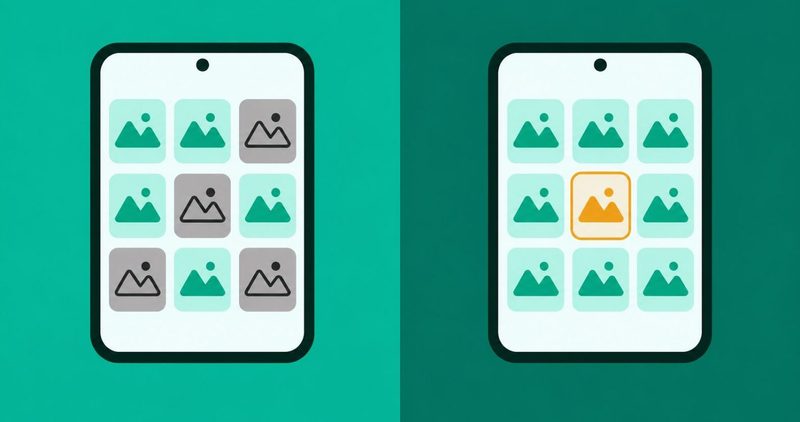
You tap the Gallery app and nothing happens. The tiles on the screen sit grey where your photos should be. Or the app opens to an empty screen. Either way, the pictures feel gone.
The fault sits in one of two places. The app itself stopped, or the photos will not show inside a gallery that opens. The two faults are fixed in different ways.
Carlcare, Transsion's service arm for Tecno, Infinix and itel, publishes the stopped-app fix on its Nigeria pages. itel's FAQ publishes the downloads case, and Samsung publishes the hidden-photo case.
Every other fault we have written sits in our Android problems hub. This post takes the gallery that will not open. It stops where a service centre takes over.
The order that finds the fault
- Restart the phone first. It clears stuck processes.
- If the gallery opens, the app was stuck. Keep working the order.
- If photos still will not show, check the folders the pictures came from.
- Clear the gallery cache, then its data. Your pictures are not deleted.
- Stop at the service centre when nothing holds.
The first test: is it the app or the folder?
Restart the phone first
Method 1 on Carlcare's own page for this fault, dated 6 April 2023 and read on 12 November 2026, is a plain restart.
A reader on r/AndroidQuestions, in a thread posted 29 March 2024, met this exact wall on an Oppo A77. The reader's words:
- "It shows grey images that don't load."
The same thread carries the recovery, and it is the short version of this whole post:
- "I did restart my phone and it fixed itself."
A forum-era thread from January 2013 on Android Central's forums puts the mechanics plainly. Android re-indexes media on every power on:
- "Sometimes, rebooting the device will fix the issue; the media scanner performs a full indexing when the device is powered on."
The same thread solved it by opening one picture in the file browser. That is a 2013 observation, history, never a current instruction.
A restart clears stuck processes. It will not fix a corrupt file, a full card, or a setting someone switched off.
What each answer means
Both answers send you somewhere different. The next step depends on what you saw.
| What you saw after the restart | What it means | What to do |
|---|---|---|
| The gallery opens | The app was stuck | Keep working this post for the grey tiles case |
| Photos still grey or missing | The pictures are hidden or in another folder | Jump to the grey tiles section below |
| The gallery still will not open | The app itself needs the next steps | Jump to the gallery app section below |
If the app still refuses to open, do not skip ahead. The free steps below run in order, cheapest first.
The grey tiles and the hidden photos
A gallery that opens but shows nothing is a different fault. Samsung's US support page, TSG10001341, read on 12 November 2026, opens with the finding:
- "If your photos are visible in My Files but are not in the Gallery app, these files or albums may be set as hidden."
The two Galaxy features to know first
Two of Samsung's steps exist on Galaxy phones only. They are named here so you know them, never as steps for your Tecno, Infinix or itel.
Image grouping lets the gallery tuck similar images into one tile. Samsung's words:
- "The Gallery app can now automatically group together similar images to help keep your images organized. This may hide some images until you tap the group."
Essential albums is the same family of hiding, for albums the owner picked. Neither exists on HiOS, and neither is offered here as a HiOS step.
The checks that work on any phone
Two of Samsung's checks are general Android. They appear here attributed to the Samsung page.
First, permissions. Samsung's words: "Photos may not be visible if the app's permissions have been denied."
The fix is general: open Settings, tap Apps, pick the app such as Gallery, tap Permissions, tap Photos and videos, allow it.
Second, the hidden-file check, through My Files. Show hidden files, open the folder the pictures live in, and delete any file named ".nomedia". That file tells Android to skip the folder. This is general Android, attributed to Samsung's page.
Samsung notes the Trash. A picture sent to the Trash is permanently deleted after 30 days. Check it in My Files and in the gallery first.
If you open photos in Google Photos
Carlcare's Google Photos page, dated 15 August 2022 and read on 12 November 2026, names the two places pictures hide. The Archive keeps pictures out of the main view. The Trash holds deleted ones. Clearing the Photos cache is its first part.
The download that vanished: two folders
Two folders explain the download case and the chat-media case. They are different folders, and the pages that publish them are different pages.
The Facebook folder, from itel's own FAQ
itel's Nigerian FAQ, read on 12 November 2026, answers one download question directly. The question is "Can't find pictures downloaded from Facebook or other websites in Gallery." Its answer, verbatim:
- "1. Search in the Facebook folder or the explorer folder. 2. Connect the device to computer, search all the pictures in phone. 3. Try to search them in your File Manager. 4. Try to reboot the phone and then check again."
Use this as itel's answer to the download case, never as a Settings route. The FAQ publishes folder steps, not button paths. The Facebook folder is the first place to look.
The WhatsApp folder, from Carlcare's Nigeria page
Carlcare's page on WhatsApp pictures and videos, dated 28 November 2022 and read on 12 November 2026, carries the media visibility line verbatim:
- "if the person has disabled the settings of WhatsApp media visibility, he might not be capable of storing the media files within side the gallery anymore."
Read that line closely, in Carlcare's own spelling. The setting lives inside WhatsApp. Media visibility is a WhatsApp setting, never a phone setting and never a HiOS setting.
Carlcare's fix is Method 2 on the page, Turn Media Visibility On, after the restart. Open WhatsApp's settings, find media visibility, and turn it on. If WhatsApp never saved the pictures, the gallery will show nothing.
The WhatsApp-media case hands over here. Our storage full post carries the same media visibility line and owns the case of deleted files that still count against storage.
Keep them apart: the Facebook folder answers downloads, and itel publishes it. The WhatsApp folder answers chat media, and Carlcare publishes it.
When the gallery app itself is stuck
This is the stopped-app case. Carlcare publishes five methods in one order: restart, clear the cache and data, update, disable and re-enable, then a third-party gallery.
Clearing gallery data does not delete your pictures
Say it out loud, because it is the step that scares people off. Carlcare's page, dated 6 April 2023 and read on 12 November 2026, gives the path in its Method 2:
- "Go to 'Settings' on your Android device. Scroll down and tap on 'Apps' or 'Applications.' Find and tap on the 'Gallery' app. Tap on 'Storage.' Tap on 'Clear cache' and 'Clear data.' Restart your device and check if the problem has been fixed."
What that clears is temporary files and settings. The pictures live on the phone's storage or on the SD card, not inside the app. Clearing the gallery's data does not delete your pictures.
Our apps crashing post documents the same mechanics, including the warning about bank apps and mobile money. The gallery is not a bank app, and Carlcare carries no such warning for it.
Update it, then disable and re-enable it
Method 3 is the outdated app. Carlcare's words: "If the Gallery app is outdated, it may not work properly."
Open the Play Store, search for your gallery app, and install any pending update.
Method 4 is disable and re-enable. Disable the Gallery app in Settings, Apps, then enable it again. It resets the app, not your files.
A third-party gallery as the last free step
Method 5 on the page is a third-party gallery app. Pick one from the Play Store and install it. It reads the same storage your own gallery reads, so the pictures are there from the first launch.
Never look for an uninstall option on the system gallery. A system app cannot leave the phone without root, and Carlcare's order never lists an uninstall step. Videos online show the Transsion AI Gallery crashing on HiOS and XOS. No maker page confirms a version broke the gallery, so no cause is claimed here.
When the photos are really gone
Sometimes the free steps run out. The card is full, the file is damaged, or the picture never reached storage at all.
The SD card that filled up
itel's FAQ carries the SD card answer, in two parts. For camera files that prefer the card but cannot be found:
- "turn off the Priority save in SD card switch and change the save location to the phone, and then try again."
For the card that is full, the pictures may now save on the phone instead, under Internal storage:
- "Find the files in Files > Internal storage."
Both are itel's folder answers. The Priority save phrase is itel's label, not a Tecno path.
The corrupted file wall
A Google Photos community thread, recorded by title only, points at file corruption or an unsupported format. It is a community snippet, not a help page. Treat it as a possibility, never a diagnosis.
The stop rule
When the free steps fail, stop. Carlcare is the reader's own after-sales arm for Tecno, Infinix and itel phones. Take the phone to a Carlcare service centre and explain the fault. No repair price is printed here, because no sourced price exists for this fault.
One itel FAQ line is worth quoting before you reach for root access:
- "It is better not to root the phone, since it would weaken the phone and cost its warranty."
Every other fault we have written sits in our Android problems hub.
Questions readers ask
Why won't my gallery open?
Usually the app, not the phone. Restart first. If the gallery opens, the app was stuck. If it still refuses, work the order in this post from the top.
Did clearing gallery data delete my photos?
No. Clearing removes temporary files and settings only. The pictures live on phone storage or the SD card.
Where did my downloaded picture go?
Check the Facebook folder or the explorer folder, per itel's FAQ. Then search File Manager, or connect the phone to a computer. Reboot once and check again.
Why can't I see WhatsApp pictures in the gallery?
Media visibility is a WhatsApp setting, not a phone setting. Open WhatsApp's own settings and turn it on. The gallery pulls what WhatsApp saves, nothing more.
Will a restart fix grey tiles?
Sometimes. The Oppo A77 owner fixed the grey images with a plain restart. If the tiles return within a day, the cache case above is the next step.
Can I uninstall the gallery app to fix it?
No. It is a system app and cannot leave the phone without root. Carlcare's order ends at a third-party gallery app instead, and so should yours.
What I tested on my Tecno Spark 40, and what I could not
The house phone for this post is a Tecno Spark 40 running HiOS on Android 15. I did not run this fault on the phone in this session. No HiOS label on this page was confirmed on the device itself.
Every printed path comes from a first-party page read on 12 November 2026, or is written as a Settings search string. Search Settings for the words inside the step, such as "clear Gallery cache".
Where HiOS shows its own label, the search bar finds it.
Tecno's own FAQ page, read on 12 November 2026, carries no mention of the word gallery anywhere in it. No Tecno page on this fault exists in the first-party record. Every quote here carries its page name and its read date.
No rate, no percentage, no price and no HiOS 16 label is printed here in any form. None of them is carried by any source used in this post.
Bottom line
Restart the phone first. Carlcare, itel's FAQ and both cases here open with it. It is not the fix. If the gallery still will not open, clear its cache and data, update it, then disable and re-enable it.
If photos will not show, check the .nomedia file and the Trash in My Files, and the Archive and Trash in Google Photos. Then check the two folders: the Facebook folder for downloads, the WhatsApp folder for chat media. If none of it holds, a Carlcare service centre is the next step.
Comments
New posts held for reviewCouldn't load comments - the thread service didn't answer. Nothing is being hidden: no approved comments are saved with this page.
No approved comments yet - the first one is yours. New posts are held for review before they appear.