 By
Wireless chargers for Android: the compatibility check, quick summary
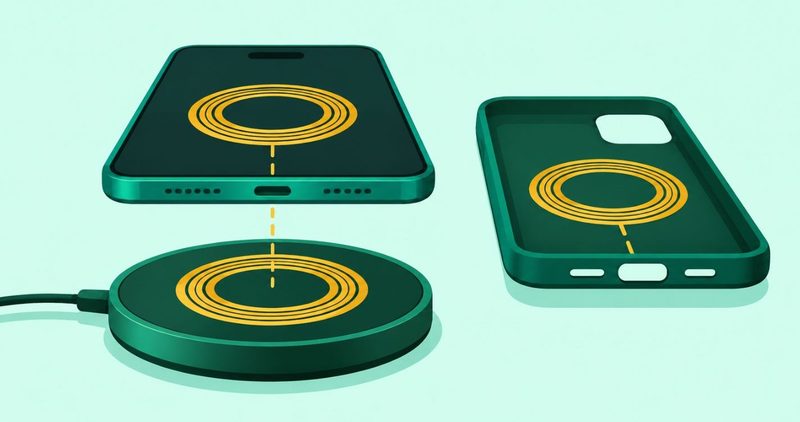
- A pad is only one link. Your phone's coil, its certified wattage and your case decide whether it charges. Check all three in the free Qi database before you buy.
- This is a compatibility guide. I could not test a pad, so no charger is ranked and no winner is named here.
- First check: open Settings, tap Battery, and look for Wireless charging. If the switch is not there, no pad will charge this phone.
- The wattage on the box is the least useful number. Your phone's own certified wattage sets the ceiling.
- Your case is a separate certified product. The wrong one can stop charging altogether.
- Nobody here bought a pad. Every link on this page is a plain link someone can check.
1. First check that your phone has a coil
You have a pad in the cart and your thumb is one tap from paying. Hold that tap. The pad is dead weight if the phone under it has no coil.
Here is the free check. Open Settings, tap Battery, and look for Wireless charging. If the switch is not there, stop. No pad or case will charge that phone.
Google's own Pixel charging help page, read on 22 November 2026, is built around exactly this question. It splits its instructions between phones that have wireless charging and phones that do not.
Google names five of its own phones with no coil. Pixel 3a, Pixel 4a, Pixel 4a (5G), Pixel 5a and Pixel 6a are all on that list. Even the flagship maker leaves holes in its own range.
The guide says an old Qi charger still works, but only up to 5 watts. A brand-new pad on an old standard hands you the oldest speed on the shelf. Predictably, nobody prints that on the box.
It also says the Pixel 10 and later will not charge on the Pixel Stand first or second generation. A maker's own accessory can be the wrong one. Check first, pay after.
The whole check takes thirty seconds and costs nothing. Do it before the pad ships. I cannot run it on the phone in my hand, which has no coil, and I say what that means near the end.
2. The number on the box is the least useful one
The box says 25 watts. The listing says 15 watts. Both numbers describe the pad, and neither one decides how fast your phone charges.
The number that binds first is your phone's own certified wattage. Google's support page puts it plainly: higher wattage usually means faster charging, but your phone must support the higher speed.
The Wireless Power Consortium's free certification database, read on 22 November 2026, held 12,136 certified products on that date. It is a lookup, not a purchase, and it is open to anyone.
Search the brand, then confirm three fields together: the product, its Load Power and its Version. Google says a Qi2 product's version number in the database should start with a 2.
Ignore capitals when you search. The database is untidy. Anker appears as both Anker and ANKER, and Samsung sits under several spellings. Type the name exactly as printed on the box and you can miss half the range.
One product name can carry five wattages. CE-LINK's wireless charger holds certified powers of 5W, 10W, 12W, 15W and 25W under that single name. That is why you read product, Load Power and Version as a set, never the name alone.
Here is the part the shopping pages skip. Google's own Pixels do not share one wattage. Look at the distinct phone models in the certification file and the split is wide.
| Declared power | Distinct Pixel phone models | What the row tells you |
|---|---|---|
| 12W | 10 | Google's most common figure |
| 25W | 5 | The top of the current range |
| 5W | 5 | The old Qi baseline |
| 15W | 4 | Includes one duplicate entry |
| 8W and 11W | 2 each | Individual generations |
| 10W, 7.5W, 0.1W | 1 each | One model apiece |
There is no single Pixel wattage. Twelve watts covers ten models and 25W sits on five at the top. Fifteen watts covers four. The number you buy against depends on the exact phone in your hand.
You may have read that Pixels take 15 watts and everyone else takes 12 watts. The certification file says no such thing. Half of all 12W records in it are Google's own, so 12W is not a generic figure for other brands.
The power ladder in the specification is short. The Wireless Power Consortium's specification history walks that ladder. Early versions set 5 watts, then 15, and the current ceiling is 25 watts. There is no 12-watt tier in the standard.
Nearly four in five certified products sit at 5 watts or 15 watts. Nothing in the file is certified above 25 watts. That ceiling comes from the specification, not from any one pad.
Your move is a lookup. Open the free database, search your phone's brand, then read Load Power beside Version. Do that before you compare a single charger.
3. Your case is a third certified product
The Wireless Power Consortium's specification history, read on 22 November 2026, records the moment the standard made room for the case. Version 2.1, in September 2024, added profiles called MCPE and MCPM for magnetic accessory covers.
The standard did not add a profile for the pad or the phone. It added one for the case. That tells you where the industry expects the weak link to sit.
Today 181 cases are certified under those profiles, and every one is listed as a receiver. Most declare 15 to 25 watts, with a few listed far lower. Of the 49 products in the file declaring 20 watts, 48 are cases, so 20 watts is almost a case-only number.
Google certifies its Pixelsnap Case separately from its Pixel phone. Two products, two certificates, one charging system. Google's help page warns that thick or metallic cases, and cases with magnet or ring holders, can affect charging or stop it completely.
So the wrong case does not hand you a slower charge. It can hand you no charge at all. A shop assistant will rarely tell you that, and the pad's box certainly will not.
Treat the case as a product in its own right. It has its own entry in the free database, and it deserves the same check you give the phone.
4. Three words that mean it is not certified
The consortium's own counterfeit page, read on 22 November 2026, gives you a three-second check that costs nothing.
If a listing says Qi compliant, Qi compatible or Works with Qi, the standards body reads that as a product that skipped proper certification testing. Those are its words, not a clever reading of them.
The standards body says a Qi logo is not a guarantee, because many products use it illegally. It also says a missing logo suggests the product is not certified. The logo fails in both directions, so the check works even when the label is smudged.
To make absolutely sure, ask for the Qi Certificate of Registration. It is valid when the URL printed on it opens a page on the consortium's site showing the identical product, brand, name and type number.
Carry both warnings the body prints about its own mark. Qi certification is not an endorsement of a product, and it does not guarantee product safety. The owner of the mark withholds both claims, so I will not make them on its behalf.
The Qi pairing guide gives the reason this matters. Non-certified products can reach temperatures high enough to cause third-degree burns.
Certification is a floor for safety and interoperability, not a speed promise. A certified pad still has to match the generation of the phone under it.
5. Pad or stand comes down to heat
Nobody here will tell you a flat pad beats a stand. There was no two-week test behind such a call.
What you can decide is heat. Our own overheating guide reports that wired charging runs cooler than wireless on its test phones. It says a pad that makes the phone hot should be swapped for a cable.
A pad lies flat, so a phone left on it charges unattended for hours. A stand props the phone up for notifications and video. Neither shape fixes a phone that runs hot.
Google notes that a phone can pause charging to protect the battery when it gets too warm. Wireless charging tends to run warmer than a cable, so give the first few nights a look before you commit.
Choose the shape by where the phone will sit, then watch the temperature. If it runs hot on the pad, use the cable. That is the site's existing advice, not a verdict on any product here.
6. No coil? Buy a cable instead
If the check in the first section came up empty, the pad question is over. A phone without a coil cannot use one, whatever the number on the box says.
Spend the money on the wire. Our wired charger guide covers wall bricks, and our USB cable guide covers the lead between the brick and the phone.
That is the honest branch for most budget phones. It costs less, it runs cooler, and it does not depend on a case you may not own.
Some habits wear a battery down while it charges on a cable. The wired charging mistakes guide on this site covers them.
7. Why no charger is ranked on this page
The title calls these the best wireless chargers, so here is the plain answer. There is no ranked list here, and no charger was tested.
Our testing rubric asks for a verdict only after a product has been used daily for two weeks. The phone in my hand has no coil, so no pad could spend a day on it, let alone two weeks.
That leaves the honest job: verifying instead of testing. The database, the maker pages and the standard are named above so you can check every claim yourself.
If a tested ranking is what you need, this page is not it. The coil check is.
8. The whole check in four lines
- Open Settings, tap Battery. No Wireless charging entry means stop.
- Open the free Qi database. Search the brand, then confirm product, Load Power and Version.
- Check the case the same way. The wrong one can stop charging altogether.
- Watch the heat for a few nights. Hot on a pad means use the cable.
The pad is the last thing you buy, not the first. Get the three checks right and the choice gets small.
Comments
New posts held for reviewCouldn't load comments - the thread service didn't answer. Nothing is being hidden: no approved comments are saved with this page.
No approved comments yet - the first one is yours. New posts are held for review before they appear.