 By
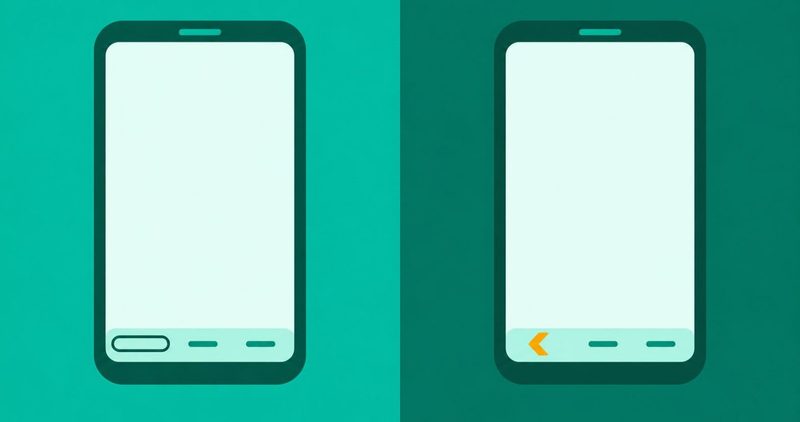
You open your phone and the bottom of the screen is empty. The three buttons that used to sit there are gone. What you see instead is a thin line, an empty space, or nothing at all.
I test on a Tecno Spark 40 running Android 15 with HiOS. The bar is usually one switch that moved, from 3-button navigation to gesture navigation.
The faults we have written sit in our Android problems hub. This post covers the one where the bar vanishes.
The order that brings the bar back
- Gesture navigation is on. Switch back to 3-button navigation.
- A full-screen app is hiding the bar. Swipe up from the bottom edge. The bar returns for a few seconds.
- A down arrow sits where Back was. It is the keyboard's hide button.
- It started after an update. Switch to gestures, restart, then switch back to buttons.
- Still gone. Restart. Then safe mode. Then the update check.
- Still nothing. Back up your phone and see a Carlcare or service centre.
If you searched back button disappeared android Nigeria, the same order works on the Tecno, Infinix and itel phones most readers carry.
Navigation buttons disappeared: check the one switch first
Google's help page, "Get around on your Android device", read on 12 November 2026, draws the line between the two modes:
- "Gesture navigation: To navigate between apps and other items, use swipe gestures rather than buttons."
- "3-button navigation: In the navigation bar, at the bottom or side of your screen, use dedicated buttons for Home, Back, and Recents."
The phone is not broken. The bar is a setting.
A system update can switch the phone to gesture navigation without telling you. If the bar vanished overnight, start here.
On a Pixel, open Settings, then System, then Navigation mode, then 3-button navigation. On other phones, open Settings, then System, then Gestures, then Navigation mode. If neither shows, search Settings for Navigation. That is Google's own fallback.
The back gesture draws from the left or right edge of the screen. If your edges are silent, the gesture dies with them. Our touchscreen guide covers a silent edge.
Where the switch lives, brand by brand
The path differs by brand. Tecno, Infinix and itel publish nothing for this symptom; their sites carry spec sheets only.
| Brand | The path, as the maker prints it |
|---|---|
| Pixel | Settings, then System, then Navigation mode, then 3-button navigation. On older Android: System, then Gestures, then Navigation mode. Or Settings search Navigation. |
| Samsung Galaxy | Settings, then Display, then Navigation bar, then Buttons. Button order sits under More options. |
| Tecno, Infinix, itel | No maker page publishes a path. Google's generic path: Settings, then System, then Gestures, then Navigation mode. Or Settings search Navigation. |
| Xiaomi, Redmi | Settings, then Home screen, then System navigation, then Buttons. |
Samsung's page, published 6 February 2025 and read on 12 November 2026: "It is the default navigation method on all Galaxy phones and tablets."
For Tecno, the one dated line comes from Carlcare, the official service arm for Tecno, Infinix and itel. Carlcare's guide is dated 26 August 2020 and was read on 12 November 2026. It prints: "To check and change, go to SETTINGS >> SYSTEM NAVIGATION >> select, KEY NAVIGATION."
Carlcare's line is the only Tecno-side path in print, and it is six years old. Tecno's site-wide search returns spec sheets. Infinix's site holds spec pages only. itel's FAQ carries zero entries for the symptom. The Infinix forum post that carried a System path could not be reached, so it is not cited.
The phone is a Tecno Spark 40 running Android 15 with HiOS. I could not open it for real while writing this. So this page prints no HiOS-specific path. If your Spark 40 shows different menus, trust the phone.
One Xiaomi rule is worth knowing: "The device will automatically disable navigation buttons when status bar is not displayed. Double tap any navigation button to re-enable." Xiaomi's page carries it, read on 12 November 2026.
Games and videos hide the bar on purpose
Samsung states the rule on the same page. Its words:
- "The Navigation bar may disappear when using full screen apps, such as games or video services. You can swipe up to temporarily see the bar when using these apps."
Normal. The bar hides so the app can fill the screen. Swipe up from the bottom edge and the bar returns for a few seconds.
The faint line at the bottom is the Gesture hint, for help on where to swipe. It means gesture navigation is on. On One UI 6.1 and later, gesture hints are not available at all. Earlier versions carry a Gesture hint toggle.
The down arrow beside the keyboard
A small down arrow where Back used to sit means the keyboard is hiding the buttons. It is the keyboard's hide button.
Galaxy phones print a "Show button to hide keyboard" toggle on the same Display, Navigation bar page. Xiaomi hides the buttons when the status bar is not displayed and brings them back on a double-tap. The keyboard ships with its own hide button, and it lands where Back used to be.
A 2025 Moto G Play owner on Android 16 described exactly this. His report, posted 13 July 2026, reads: "the leftmost (back) button has disappeared, only appearing as a down arrow when the onscreen keyboard is open". The accepted fix was gesture navigation, a restart, then back to 3-button navigation. His reply: "this worked!" (the thread, read 12 November 2026; Reddit does not serve plain fetches, so read it in a browser.)
What to do: look at the down arrow. If tapping it closes the keyboard, your Back button is fine. The keyboard side of this fault sits in our keyboard guide.
The after-update cases, dated and named
If the bar vanished the night your phone updated, nothing says the update deleted your buttons.
| The case | What happened | Where it comes from |
|---|---|---|
| Pixel after Android 12 | Bar disappeared until a restart. Pixel 4a and a Pixel 6 Pro. | Reddit, posted 6 November 2021 |
| Samsung after One UI 8.5 | NavStar's hide-button bug. The bar would not hide for some users. Samsung acknowledged it. Fixed in One UI 9.0. | Android Authority, published 13 August 2026 |
| Android 16 | One Moto G Play owner got an empty space where Back was, except a down arrow with the keyboard open. | Reddit, posted 13 July 2026 |
| Samsung after One UI 7 | A Galaxy A02s lost Home and Recents in restricted mode, until a PIN was set. One UI 7 made the PIN mandatory; the buttons returned after it went in. | Samsung EU community, resolved 23 May 2025 |
The Samsung case is scoped exactly. The bug sits in NavStar's hide-button function, shipped with One UI 8.5. Android Authority, published 13 August 2026, read 12 November 2026, reports Samsung acknowledged the glitch and the fix is in One UI 9.0. It is about the bar refusing to hide.
The Pixel report, posted 6 November 2021: "nothing seems to get them back other than restarting. I can still press the black spaces where they used to be and they work". Read 12 November 2026.
Android's edge-to-edge rule is developer law. Apps targeting Android 16 cannot opt out of drawing behind the navigation area. It changes how apps draw, not where your button is. (Google's developer documentation, read 12 November 2026.)
No maker page ties a named Android 16 or HiOS build to a missing back button. If none of the cases matches yours, the order below still applies.
The order, from one minute to the service centre
- Check the navigation mode first. Gestures on means no buttons.
- In games and videos, swipe up from the bottom edge. The bar returns for a few seconds.
- If a down arrow shows with the keyboard, tap it or switch the keyboard toggle off.
- If it started after an update, run the round trip: gestures, restart, 3-button.
- Restart the phone.
- Boot safe mode. If the bar works there, a downloaded app broke it. Uninstall the newest suspects one at a time. Our safe mode guide shows the path.
- Check for the next system update.
- Factory reset prints last. Destructive. Back up first. Carlcare checks the navigation mode, restarts, safe mode, and resets only after those fail.
Carlcare's stop rule is dated 26 August 2020 and was read on 12 November 2026. Its words: "If none of the previously mentioned solutions have fixed your TECNO smartphone's Home button, the problem is perhaps Hardware related."
If the bar still does not come back, or the buttons draw but do nothing, stop. Back up the phone first. Take it to a Carlcare centre for a Tecno, Infinix or itel, or to a Samsung service centre for a Galaxy. Carlcare prints that it repairs your phone for free for non-artificial damage while the phone is under warranty. The out-of-warranty price prints nowhere this guide read, so ask at the centre (read 11 November 2026). What your phone needs is what the centre tells you.
Questions readers ask
How do I bring the 3 buttons back on a Pixel?
Settings, then System, then Navigation mode, then 3-button navigation. On older Android: System, then Gestures, then Navigation mode. Or search Settings for Navigation. (Google 9079644, read 12 November 2026.)
Which path works on Tecno, Infinix or itel?
The one path in print is Carlcare's from 2020: SETTINGS >> SYSTEM NAVIGATION >> KEY NAVIGATION. Everything else is Google's generic path plus Settings search for Navigation. Nothing newer exists on any of the three sites.
The bar only disappears in games. Is that normal?
Yes. The bar hides in full-screen apps such as games or video services. Swipe up to see it. (Samsung ANS10002427, read 12 November 2026.)
Did the update break my navigation bar?
Possibly, and the evidence is dated. Pixel owners reported it after Android 12 (Reddit, November 2021, read 12 November 2026). Samsung acknowledged a One UI 8.5 NavStar hide-button bug, fixed in One UI 9.0 (Android Authority, 13 August 2026, read 12 November 2026). One Moto G Play on Android 16 fixed it with a gesture, reboot, 3-button round trip (Reddit, 13 July 2026, read 12 November 2026). One UI 7 left a Galaxy A02s in restricted mode until a PIN was set. (Samsung EU community, resolved 23 May 2025, read 12 November 2026.)
Will a factory reset fix it?
Rarely. Carlcare checks navigation, a restart and safe mode first, and resets only after those fail. Back up first. A reset is destructive.
Why is there a down arrow where Back was?
The keyboard's hide button. Samsung prints a "Show button to hide keyboard" toggle on the navigation bar page. Xiaomi hides the buttons when the status bar is not displayed and brings them back on a double-tap. (Samsung ANS10002427, read 12 November 2026; Xiaomi KA-497634, read 12 November 2026.)
What I could not test on my Tecno Spark 40, and why
The house phone here is a Tecno Spark 40 on Android 15 with HiOS. While writing this post I could not open the phone for real. No HiOS label on this page was confirmed on the device. The Spark 40 ships Android 15; that is all its spec sheet prints (read 12 November 2026).
That is why no HiOS path prints. Tecno, Infinix and itel publish no navigation-button page. The only Tecno-side line in print is Carlcare's from 2020. Google's generic path and the Settings search string carry the rest. If your phone shows different menus, the phone wins.
No source supports the following, so this page prints none of it: a Nigerian price, a HiOS version claim, or a HiOS-specific navigation path.
Bottom line
The bar is a setting, not a part. Check gesture navigation first. Full-screen games hide it on purpose. A down arrow is the keyboard's hide button. The after-update cases are real, dated and named. Work the order, back up before the destructive steps, and stop at the service centre when the free steps run out.
Comments
New posts held for reviewCouldn't load comments - the thread service didn't answer. Nothing is being hidden: no approved comments are saved with this page.
No approved comments yet - the first one is yours. New posts are held for review before they appear.